
Prism Launcher
Prism Launcher is a free Minecraft launcher. It helps you manage mods, modpacks, and game versions. Create separate setups, change settings, and enjoy Minecraft your way on Windows, Linux, and macOS.
Download Now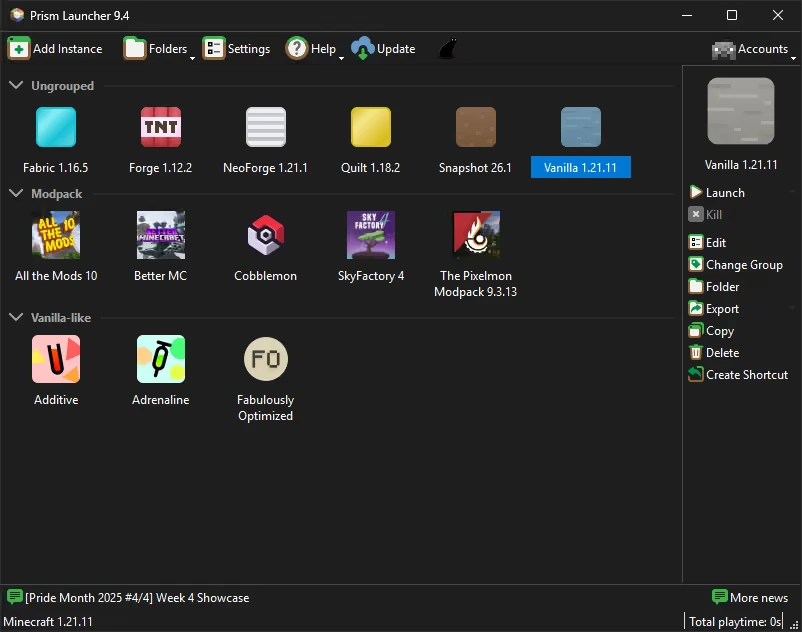
Minecraft is more fun when you can try new mods, worlds, and game versions. But managing many setups can become difficult. Prism Launcher makes this easier by keeping everything organized in one place. It allows players to create separate Minecraft setups with their own versions, mods, settings, and files. You can use one setup for normal gameplay and another for modded Minecraft. Whether you are a new player or a long-time Minecraft fan, Prism Launcher helps you enjoy the game with better control and less confusion.
Table of Contents
What Is Prism Launcher?
Prism Launcher is a free and open-source Minecraft launcher. It helps players create and manage different Minecraft setups called instances. Each instance can have its own Minecraft version, mods, settings, and game files. This keeps different setups separate and prevents conflicts. Players can use PrismLauncher for vanilla Minecraft, modpacks, and custom builds.
It supports popular mod loaders like Forge, Fabric, and Quilt. The launcher is designed for players who want more freedom and better organization while managing their Minecraft experience.
Prism Launcher Features
Create Separate Minecraft Instances
Prism Launcher allows players to create separate Minecraft instances. Each instance works like a different version of the game. You can create one setup for survival, one for mods, and another for testing. Every instance has its own files and settings. This means changes in one setup do not affect another. It saves time and makes it easier to switch between different Minecraft experiences.
Easy Modpack Management
Modpacks often include many files and settings. Installing them manually can take a lot of time. Prism Launcher makes this process easier by helping players add and manage modpacks. Each modpack stays in its own instance, which keeps files organized. You can test new packs, remove old ones, and switch between different experiences without changing your main Minecraft setup.
Support for Forge, Fabric, and Quilt
Many Minecraft mods need a specific mod loader to work. Prism Launcher supports popular loaders like Forge, Fabric, and Quilt. This gives players more options when creating custom Minecraft setups. You can choose the loader that matches your favorite mods and build the type of gameplay you want. This makes the launcher useful for both simple mods and large modded worlds.
Simple Mod Management
Adding and removing mods is easier with Prism Launcher. Players do not need to search through many folders to manage every file. Each Minecraft instance has its own mod collection. If a mod causes problems, you can check that specific setup without affecting your other worlds. This makes testing new mods safer and helps keep your Minecraft files clean.
Different Settings for Each Setup
Every Minecraft setup can need different settings. A small vanilla world may need fewer resources, while a large modpack may need more power. Prism Launcher lets players adjust settings for each instance. You can change memory options, Java settings, and other configurations separately. This helps each Minecraft setup run better based on its own needs.
Resource Pack and Shader Support
Many players enjoy changing Minecraft graphics with resource packs and shaders. Prism Launcher helps keep these files organized with each instance. You can use different visual settings for different worlds. For example, one instance can use simple textures while another can use high-quality shaders. This makes it easier to test new designs without moving files manually.
Clean and Lightweight Design
Prism Launcher focuses on useful features without adding unnecessary tools. Its simple design helps players manage Minecraft quickly. The interface is clean, easy to understand, and focused on organization. Users who want more control without a heavy launcher often prefer this approach. It provides the tools needed for Minecraft management while keeping the experience simple.
Prism Launcher Offline Mode
Many players search for Prism Launcher Offline because they want to know if they can play without an internet connection. Prism Launcher can open and manage Minecraft setups that are already installed on your device. You can play local worlds and use installed mods without downloading files again. However, some features still need internet access, such as downloading updates, getting new versions, or checking account details.
Custom Themes and Interface Options
Prism Launcher gives users options to personalize the launcher interface. Players can adjust the look and feel of the application based on their preferences. A clean interface makes it easier to find Minecraft versions, modpacks, and saved instances. These small customization options improve the overall experience, especially for users who manage many different Minecraft setups.
Import Minecraft Modpacks Easily
Large Minecraft modpacks can be difficult to install manually. They often contain many mods, settings, and required files. Prism Launcher helps players import supported modpacks with fewer steps. The launcher keeps every pack separate and organized. This allows users to try new modded experiences without spending extra time moving files or fixing installation problems.
Manage Multiple Minecraft Accounts
Some players use more than one Minecraft account. One account may be used for personal gameplay, while another may be used for testing or multiplayer. Prism Launcher helps users manage different accounts inside one application. This makes switching between profiles easier and saves time. Players do not need to change settings every time they want to use another account.
Game Logs for Fixing Problems
Modded Minecraft can sometimes crash because of wrong versions, missing files, or incompatible mods. PrismLauncher provides access to game logs that help players find the cause of problems. These logs are useful when asking the Minecraft community for help. They allow users to understand errors and fix issues without guessing.
Open-Source Development
One major advantage of Prism Launcher is that it is open source. The project code is available publicly through Prism Launcher GitHub. Developers and community members can review the code, report issues, and suggest improvements. This creates a transparent development process and helps the launcher continue improving with support from the Minecraft community.
Support for Different Minecraft Versions
Many players enjoy different Minecraft versions for different reasons. Some versions support older mods, while others are needed for specific servers or gameplay styles. Prism Launcher allows users to create separate instances for different versions. You can keep old and new Minecraft setups together without reinstalling the game every time you want to switch.
Better Organization for Modded Minecraft
Managing many Minecraft mods can become confusing. Prism Launcher helps players keep everything organized by separating each setup. You can create different profiles for mod testing, survival worlds, and large modpacks. This makes it easier to manage files and avoid conflicts. For players who spend a lot of time with Minecraft mods, this organization can save a lot of effort.
Prism Launcher Main Categories
Prism Launcher is useful for many types of Minecraft players. Beginners can use it to organize simple game versions, while advanced users can manage large mod collections. The main categories include vanilla Minecraft, modded Minecraft, custom modpacks, testing setups, and different game versions.
Players can create a separate instance for each purpose. For example, you can have one setup for normal survival gameplay and another for a large modpack. This keeps every Minecraft experience clean, organized, and easy to access.
Prism Launcher Minecraft Experience
Many Minecraft players choose Prism Launcher because it gives them more control over their game. Instead of keeping every mod and version together, users can create separate setups for different needs.
For example, you can create one instance for vanilla Minecraft, another for Fabric performance mods, and another for a large Forge modpack. Each setup works separately, so changes in one instance do not affect others. This is helpful for players who enjoy testing new mods or trying different Minecraft versions. Manual file management can become confusing when many mods are involved. Prism Launcher reduces this problem by keeping everything organized.
For long-time Minecraft users, organization is just as important as gameplay. With Prism Launcher Minecraft setups, players can quickly manage versions, mods, and configurations from one simple place. This makes it a popular choice among the modded Minecraft community.
How to Download and Install Prism Launcher
Downloading and installing Prism Launcher is easy, even if you are using a custom Minecraft launcher for the first time. The safest way to get the launcher is from the official Prism Launcher website or trusted project pages. After installation, you can connect your Minecraft account, create a new instance, select your preferred game version, and add mods or modpacks.
Before installing, check that your device has enough storage and can run Minecraft smoothly. If you plan to use large modpacks, having enough RAM can improve your experience. Always avoid unofficial downloads because modified files may contain unsafe software or outdated versions.
Steps to Download Prism Launcher
- Visit the official Prism Launcher website.
- Choose your operating system.
- Download the correct installer file.
- Open the setup file.
- Follow the installation steps.
- Launch Prism Launcher.
- Add your Minecraft account.
- Create a new Minecraft instance.
- Select your Minecraft version and mod loader.
- Install mods or modpacks and start playing.
Prism Launcher Download for Windows PC
Windows users can easily install Prism Launcher on their computers. The Windows version is widely used because it works well with different Minecraft versions, mods, shaders, and modpacks. After installing the launcher, players can create separate Minecraft instances and customize each setup.
The Prism Launcher download for PC process only takes a few steps.
Download the Windows installer, complete the setup, and open the application. After signing in with your Minecraft account, you can create your first instance and start customizing your game.
Downloading from official sources is important. Official files include the latest updates and security fixes. Avoid third-party websites that offer modified installers because they may contain unwanted programs or unsafe files.
Prism Launcher Download for macOS
Mac users can also use Prism Launcher to manage their Minecraft setups. The macOS version provides many of the same features as Windows, including instance management, mod support, version control, and modpack handling.
Installing Prism Launcher on Mac is simple. Download the correct macOS file, move the application to your Applications folder, and open it. Sometimes macOS may ask for permission before opening an app downloaded from the internet.
For players using MacBooks or iMac devices, Prism Launcher offers a better way to organize Minecraft. You can keep different worlds, mods, and versions separate without manually changing game files.
Prism Launcher Download for Linux
Prism Launcher also supports Linux systems. It is a good option for users who prefer open-source software and want more control over their applications.
Linux users can install the launcher through official packages or supported methods for their distribution. After installation, players can create Minecraft instances, add mod loaders, and manage different versions.
The Linux version provides the same organized Minecraft experience as other platforms. It allows users to manage mods, modpacks, and game settings while keeping each setup separate.
Prism Launcher on iOS and Mobile Devices
Many users search for Prism Launcher APK because they want to use the launcher on mobile devices. However, the official Prism Launcher project is mainly designed for desktop platforms like Windows, macOS, and Linux.
There is no official iOS version of Prism Launcher. Users should be careful with websites that claim to offer an official mobile app or APK file. These files may not be connected to the real project and could create security risks.
If you are looking for Minecraft tools on mobile, always check the developer information before installing anything. Avoid unknown APK files that use the Prism Launcher name without verification.
Prism Launcher APK: What You Need to Know
The keyword Prism Launcher APK is searched by many Minecraft players who want an Android version. However, the official project focuses on desktop computers rather than mobile devices.
Because Prism Launcher is open source, unofficial versions may appear online. Some websites may use the name to attract downloads, but these files may not be created by the official team.
Before downloading any APK file, check:
- Who created the application
- Where the file comes from
- What permissions it requests
- Whether it is linked to the official project
For better security, download Prism Launcher only from trusted sources. Avoid unknown APK websites that may provide modified or unsafe files.
Prism Launcher Offline Mode Explained
Many players search for Prism Launcher Offline because they want to understand offline gameplay. Prism Launcher can manage Minecraft instances that are already installed on your device.
You can play local worlds and use installed mods without downloading files again. However, some features still require an internet connection. These include downloading new versions, updating files, and checking account information.
Offline mode is useful when your Minecraft setup is already ready. It allows players to continue enjoying their local game without needing constant internet access. However, you still need a valid Minecraft account for official features.
Prism Launcher GitHub: Open-Source Development
One of the reasons players trust Prism Launcher is its open-source development. The project code is available through Prism Launcher GitHub, where developers and community members can view and improve the software.
Open-source projects provide more transparency because users can see how the application is developed. The community can report bugs, suggest improvements, and follow future updates.
For advanced Minecraft users, the GitHub repository is also useful for checking changes and understanding new features. It shows the active development behind Prism Launcher and helps keep the project updated.
Is Prism Launcher Safe and Legal to Use?
Yes, Prism Launcher is safe to use when you download it from official sources. It is an open-source Minecraft launcher, which means its source code is available for review. Developers and community members can check the project, report problems, and help improve the software.
The main safety concern comes from unofficial websites.
Some sites may offer fake installers, modified files, or unknown Prism Launcher APK downloads. These files may not be connected to the real project and could create security problems. Always download the launcher from trusted sources.
Prism Launcher is also legal software. It does not provide free Minecraft accounts or remove the need for official game ownership. It is simply a tool that helps players manage their Minecraft versions, mods, and modpacks. Users should play with a valid Minecraft account and follow Minecraft’s rules.
Advantages of Prism Launcher
Better Minecraft Organization
Prism Launcher makes managing Minecraft files much easier. Players who use many versions, mods, or modpacks can keep everything separated in different instances.
You can create one setup for survival gameplay and another for mod testing. This keeps files organized and reduces problems caused by mixing different Minecraft versions together.
Strong Mod Support
Mod support is one of the main reasons players choose Prism Launcher. It works with popular mod loaders like Forge, Fabric, and Quilt.
Players can create custom Minecraft experiences with different mods and settings. Whether you want small improvements or a complete modded world, Prism Launcher gives you more control over your setup.
Open-Source Project
Prism Launcher is built as an open-source project. Its code is available through the community, allowing developers to review and improve the software.
This approach creates more transparency. Users can follow updates, report bugs, and see how the launcher continues to improve over time.
Multiple Minecraft Versions
Many Minecraft players enjoy different versions of the game. Some mods only work with older versions, while some servers require specific releases.
Prism Launcher allows you to keep multiple Minecraft versions installed. You can switch between them without reinstalling the game every time.
Simple and Lightweight Experience
Prism Launcher focuses on useful features instead of unnecessary extras. The clean design makes it easier to manage Minecraft without using a heavy application.
Players who want a simple but powerful launcher often prefer Prism Launcher because it provides control while keeping things easy to understand.
Possible Limitations of Prism Launcher
Takes Time to Learn
New users may need some time to understand Minecraft instances, mod loaders, and settings.
Players who only use the official Minecraft launcher may find Prism Launcher different at first. However, learning the basics makes it much easier to manage custom setups.
Desktop Focus
Prism Launcher is mainly designed for desktop platforms, including Windows, macOS, and Linux.
Users searching for Prism Launcher APK should be careful. The official project does not focus on mobile devices, and many APK files online are unofficial.
Basic Minecraft Knowledge Helps
Prism Launcher is beginner-friendly, but some features are made for players who understand Minecraft versions and mods.
Knowing how mods, loaders, and versions work can help users create better setups and solve problems faster.
Prism Launcher vs Official Minecraft Launcher
Both launchers are useful, but they are designed for different types of players.
The official Minecraft launcher focuses on simple gameplay. Prism Launcher focuses on customization, organization, and managing multiple setups.
| Feature | Prism Launcher | Official Minecraft Launcher |
|---|---|---|
| Multiple Instances | Yes | Limited |
| Mod Support | Strong | Basic |
| Open Source | Yes | No |
| Custom Settings | More options | Limited |
| Modpack Management | Easier | More manual |
| Beginner Use | Needs learning | Very simple |
Players who enjoy normal Minecraft may prefer a simple launcher. Players who use mods, modpacks, and different versions often prefer Prism Launcher because it gives more control.
Tips for Using Prism Launcher Better
Keep Your Instances Organized
Give each Minecraft instance a clear name. For example, create separate names for survival worlds, mod testing, and multiplayer setups.
This makes it easier to find the right setup when you have many instances.
Use Compatible Mods
Always check that your mods match your Minecraft version and mod loader.
Using the wrong versions together can cause crashes or errors. Checking compatibility before installation can save time.
Backup Important Worlds
Keep backups of your important Minecraft worlds and files.
Even though Prism Launcher helps organize your game, backups protect your progress if something goes wrong.
Download From Trusted Sources
Always download Prism Launcher from official sources.
Avoid websites that offer modified versions, unknown installers, or unofficial Prism Launcher download APK files.
Keep Prism Launcher Updated
Updates often include fixes, improvements, and better support for new Minecraft versions.
Using the latest version helps you get a smoother and safer experience.
Final Thoughts
Prism Launcher is a great option for Minecraft players who want better control over their game. It makes managing mods, versions, and modpacks easier by keeping every setup separate.
For players who enjoy modded Minecraft, Prism Launcher provides useful tools to create and manage custom experiences. Features like separate instances, mod loader support, and version management make it easier to enjoy different types of gameplay.
Many users search for Prism Launcher download, Prism Launcher Minecraft, and Prism Launcher APK because they want a better Minecraft experience. However, users should always download the launcher from trusted sources and avoid unofficial files.
If you enjoy testing mods, playing different Minecraft versions, or keeping your game organized, Prism Launcher provides a simple and flexible solution.
Frequently Asked Questions (FAQ)
What is Prism Launcher?
Prism Launcher is an open-source Minecraft launcher that helps players manage different versions, mods, and modpacks in one place.
Is Prism Launcher free?
Yes, Prism Launcher is free and open-source software available for Minecraft players.
Does Prism Launcher support mods?
Yes, Prism Launcher supports mod loaders like Forge, Fabric, and Quilt for modded Minecraft gameplay.
Can I use Prism Launcher offline?
Yes, you can use installed Minecraft setups offline, but some features require an internet connection.
Is Prism Launcher available for Android?
The official Prism Launcher project focuses on desktop platforms. Be careful with unofficial APK downloads.
Where can I find Prism Launcher GitHub?
You can find the source code through the official Prism Launcher GitHub repository.